

Google Ads is moving more existing Search campaign functionality into AI Max, giving its automation a larger role in how ads are matched, written, and delivered.
Campaigns using automatically created assets and campaign-level broad match settings already began transitioning in September 2026. Dynamic Search Ads will follow in February 2027.
Google says the automatic upgrades are designed to preserve existing campaign settings. However, AI Max also brings additional controls and optimization options that advertisers have the option to enable.
For PPC managers, this is a good time to review which decisions Google is already making, which settings are active in your accounts, and whether those settings are aligned with your business goals.
Here’s what to audit before giving AI Max more control over existing Search campaigns.
1. Start With What’s Already Enabled In Your Search Campaigns
Before changing anything, it’s crucial to understand how AI Max is currently configured across your accounts, if at all.
Google’s migration process doesn’t enable every AI Max feature automatically for every campaign. The settings depend on which legacy functionality each campaign was using.
According to Google’s migration documentation:
- Automatically Created Assets (ACA): Campaigns transition with search term matching and text customization enabled.
- Campaign-level broad match: Campaigns transition with search term matching enabled.
- Dynamic Search Ads (DSA): The February 2027 migration will enable search term matching, text customization, and Final URL expansion, while also preserving legacy URL controls.
This is why it’s worth checking each campaign, because two campaigns showing AI Max as enabled may have very different levels of automation running.
Within Google Ads, review the AI Max settings at both the campaign and ad group levels. Specifically, check whether search term matching, text customization, and Final URL expansion are active.
Search term matching can be controlled at the ad group level, while text customization and Final URL expansion are campaign-level settings.
I’d also look at whether any campaigns have different configurations than expected, especially those that were recently migrated or created using Google’s default settings.
The goal here is to establish what’s running before making additional changes. Otherwise, it becomes difficult to evaluate which AI Max features are influencing performance.
2. Audit Which Searches AI Max Is Matching Against
Search term matching is one of the areas I’d spend the most time reviewing, especially in campaigns with tightly defined keyword strategies.
AI Max can use broad match and keywordless matching technology to identify additional searches based on existing keywords, ads, and landing pages.
While it can help campaigns reach relevant searches that weren’t covered by the original keyword list, it’s also notorious for introducing traffic that doesn’t fit the campaign’s intended purpose.
Research from Mike Ryan at Smarter Ecommerce (SMEC) shows how much AI Max can expand beyond an advertiser’s existing keyword targeting.
In an analysis of 383 million impressions, Ryan found that more than 25% of impressions attributed to exact match keywords in AI Max-enabled Search campaigns came through AI Max search term matching.
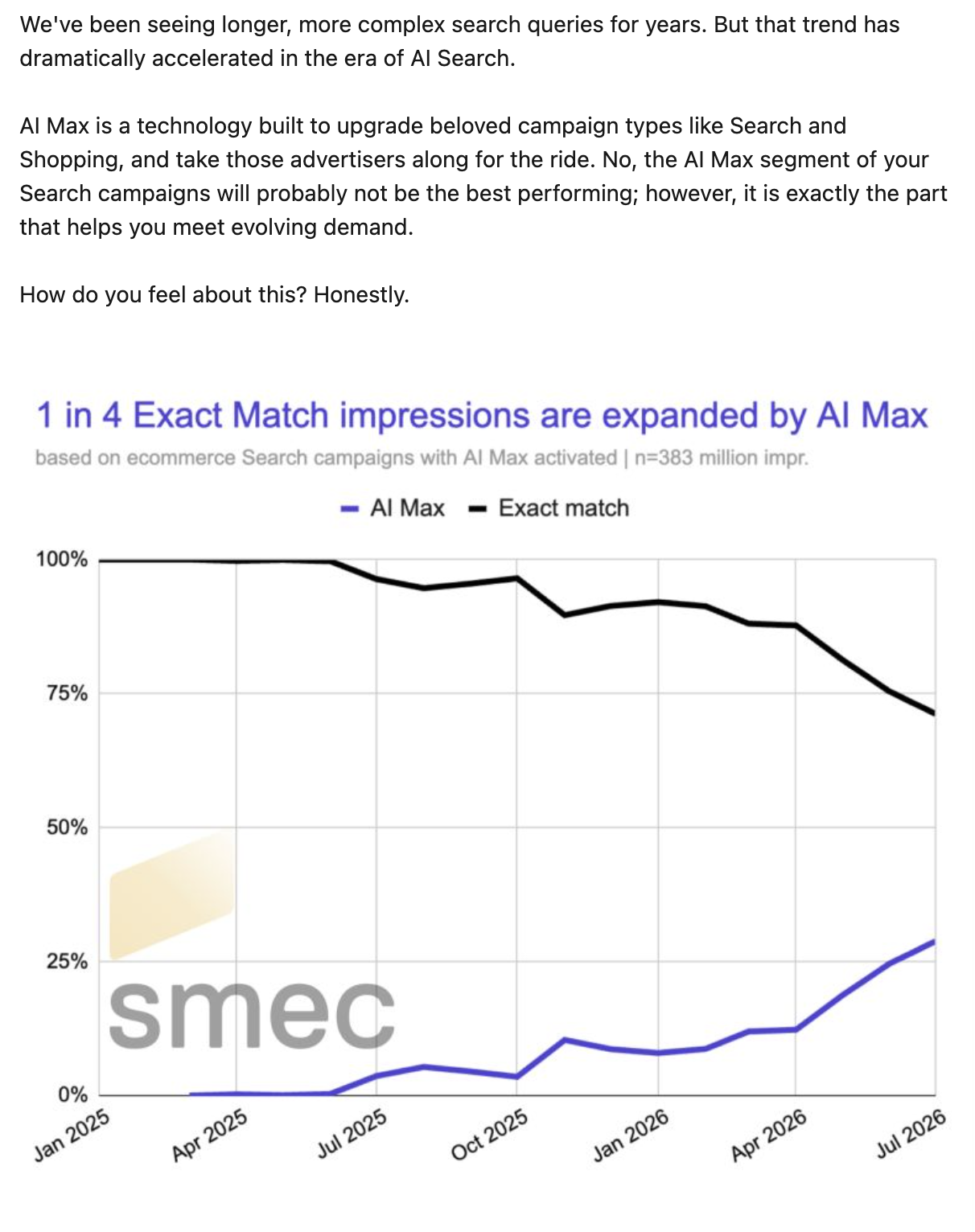
That doesn’t mean those searches were necessarily irrelevant. However, it does show why advertisers shouldn’t assume exact match keywords are limiting traffic to their original targeting.
What To Check In The Search Terms Report
Google’s AI Max reporting documentation outlines additional reporting fields that can help advertisers understand how searches are being matched.
When reviewing Search terms, I’d focus on:
- Match type and source: Identify searches attributed to AI Max and review how Google matched them.
- Search intent: Look for informational, comparison, and research-focused searches that may be further from conversion.
- Competitor searches: Check whether AI Max is expanding into competitor terms that weren’t part of the original strategy.
- Brand searches: In the same realm, check whether AI Max is sneaking in branded terms that shouldn’t be shown in a non-brand campaign.
- Cost and conversions: Compare the performance of expanded searches against existing traffic.
- Headline and landing page combinations: Check which ad copy and landing pages Google is serving for AI Max search terms, and whether they align with the user’s intent.
Competitor searches might deserve some extra attention, based on Ryan’s research.
In SMEC’s research, Ryan documented one account where competitor searches accounted for 69% of total Search impressions.
That’s a single-account example, but it shows how heavily the traffic mix can lean toward searches outside the advertiser’s original targeting.
I also wouldn’t judge every new search term solely by whether it converts immediately.
Some campaigns may have some wiggle room to support earlier-stage research, especially when there’s enough budget to fund it without taking away from stronger existing demand.
However, if a campaign is already struggling to capture its highest-intent searches, expanding into more informational traffic might be worth excluding for the time being.
Negative keywords remain available with AI Max, along with brand controls and ad group-level locations of interest.
3. Review The Ad Copy Google Is Creating And Serving
Text customization allows Google to generate additional headlines and descriptions using existing ads, keywords, and landing page content.
For advertisers already using automatically created assets, the audit should focus on what’s being generated and how those assets are performing.
Google’s optimized asset reporting provides additional performance metrics, including spend and conversions, to help advertisers evaluate the assets being served.
I’d look closely at three areas:
- Accuracy: Does the generated copy accurately describe the product, service, pricing, or offer?
- Messaging: Is Google emphasizing benefits that align with the campaign’s intended audience?
- Performance: Which generated assets are receiving spend and contributing to conversions?
A generated headline could be technically accurate for the business but inappropriate for the campaign’s audience.
This deserves additional review in industries with legal, compliance, or partner messaging requirements.
Google allows advertisers to review and remove generated assets. It has also introduced AI Brief and text disclaimer controls to provide additional guidance over generated messaging.
See also: Should You Use Auto-Generated Creative? – Ask A PPC
Check Whether Pinned Assets Are Being Respected
There’s another consideration for campaigns that rely on responsive search ad pinning.
Google’s AI Max documentation confirms that pinning isn’t always respected when Final URL expansion is enabled.
When Google selects a different landing page, it may generate ad copy that better matches that destination rather than using the advertiser’s pinned assets. Pinning also isn’t respected when URL inclusions are provided.
For campaigns with required disclaimers, pricing language, or partner-approved messaging, I’d check whether the current settings support those requirements.
If pinning is essential, Google recommends avoiding Final URL expansion and URL inclusions.
4. Check Where Final URL Expansion Is Sending Traffic
When Final URL expansion is enabled, Google can select a different landing page from the advertiser’s website based on the search query.
That may help when a website has several relevant product or service pages, but it can also create problems when the destination doesn’t align with the campaign’s goals.
A website might contain informational articles, support documentation, and pages promoting services outside the campaign’s intended focus.
Those pages could be relevant to someone’s search, but not something worth spending PPC dollars on.
Google’s landing page and search term reporting can help identify which URLs are receiving traffic through AI Max.
I’d review:
- Which landing pages are receiving traffic that wasn’t originally intended for them.
- Whether those pages have an appropriate conversion path.
- If the landing page matches the offer and messaging shown in the ad.
- If traffic is reaching pages that should be excluded from PPC campaigns.
For lead generation, I’d also look beyond the initial form submission.
A landing page might generate more leads while attracting more unqualified customers. That can be difficult to identify without qualified lead or sales data.
Google supports URL exclusions at the campaign level and URL inclusions at the ad group level.
Those controls can help advertisers limit where traffic goes without necessarily turning off Final URL expansion across an entire campaign.
For accounts with tightly controlled conversion experiences, I’d review the available URLs before enabling broader expansion.
See also: Should Your PPC Strategy Focus On The Lead Pipeline Or Revenue?
5. Check Whether AI Max Is Providing Quality Conversions
Google has reported that advertisers using the full AI Max feature suite see an average of 7% more conversions or conversion value at a similar CPA or ROAS compared with using search term matching alone.
That figure comes from Google’s internal 2026 data for non-retail advertisers, and it shouldn’t be treated as an expected result for every account.
Independent research from Smarter Ecommerce offers another perspective.
In a March 2026 analysis of more than 250 campaigns, Mike Ryan found that AI Max generated a median 13% more conversion value relative to the remaining campaign revenue.
However, those conversions came at a median CPA that was 16% higher than the campaign baseline.
ROAS results also varied considerably. While the median difference was 0%, individual campaign results ranged from 42% above baseline to 35% below it.
These figures come from observational campaign data rather than controlled experiments measuring incremental performance. Ryan also noted that the analysis couldn’t account for potential cannibalization across campaigns.
The research doesn’t mean AI Max is underperforming across the board. It suggests that additional conversion volume may come at a higher cost, with results varying significantly between accounts.
If broader matching is reaching more informational or earlier-stage searches, those users may need more time before converting. Some may never become customers.
For lead generation, I’d compare the quality of conversions coming through AI Max against existing traffic. Are those leads qualified? Are they turning into opportunities or customers?
For ecommerce, revenue, ROAS, margin, and the products being sold can provide more information than conversion volume alone.
Use Experiments To Evaluate The Impact
Google has expanded its AI Max experimentation tools, including the ability to maintain brand and location controls during testing.
For campaigns that haven’t fully adopted AI Max, experiments can help compare performance before enabling additional functionality.
I’d avoid changing several settings at once because it’s more difficult to attribute performance swings to a particular feature set of AI Max.
If the goal is to understand whether broader matching improves performance, structure the test around that decision. The same applies to Final URL expansion or text customization.
Google’s experiment setup has eligibility restrictions, so not every existing campaign can use the same testing approach.
For campaigns already migrated with legacy functionality enabled, reviewing current performance may help identify which settings are worth testing next.
6. Prepare Dynamic Search Ads Before February 2027
Advertisers still running Dynamic Search Ads have time before Google’s automatic migration begins in February 2027.
Google says the migration will convert dynamic ad groups into standard ad groups while preserving supported legacy settings and data. Its upgrade documentation also notes that unsupported legacy DSA targets may become read-only.
I’d review existing dynamic ad targets, URL exclusions, and search term performance before the transition.
Some campaigns may contain targeting decisions that made sense when they were created but haven’t been revisited recently.
For advertisers with complex websites or large inventories, confirming which pages and services should remain eligible is worth doing before the migration.
What To Prioritize Before Making More AI Max Changes
I wouldn’t approach this audit by immediately turning off AI Max features or adding restrictions across every Search campaign.
Some accounts may benefit from giving Google more flexibility to find relevant searches, customize messaging, and select landing pages.
I’d start with campaigns where those decisions could have the greatest impact on performance or where existing controls serve a clear purpose.
That includes campaigns with limited budgets, strict lead qualification requirements, regulated messaging, or carefully managed landing page experiences.
For campaigns already performing well, reviewing current settings and reporting may be enough to determine whether additional testing is worthwhile.
As Google moves more Search functionality into AI Max, advertisers still have control over several important decisions. Knowing what’s enabled, how Google is using that flexibility, and what results the business is receiving should guide where those controls are applied.
More Resources:
- AI In Regulated Paid Media: The Default Settings That Put Compliance At Risk
- How Do I Keep Control As Platforms Automate My Account? – Ask A PPC
- Google Ads Is Automating More Decisions, Your Measurement Needs To Get Better
Featured Image: Roman Samborskyi/Shutterstock
