

Content management systems (CMS) often try to force SEOs into a box of “this is how a website should work.” The problem is that SEO has never been a black-and-white thing and so often depends upon the individual website, industry, and brand as to how we may want to structure indexing, content, and infrastructure.
Over my years as an in-house SEO, consultant, and web developer, I’ve worked with a wide range of CMS. Even though we continue to see improvements across platforms, many still fail to meet the base-level requirements and flexibility we as SEOs need day-to-day. This results in us as an industry being on repeat, submitting the same ticket for a fix again and again.
The Bare Minimum A CMS Should Offer
What do I consider to be the actual bare minimum a CMS should offer for SEOs and content creators? Every week I continue to find out about often well-known platforms missing what I would consider a baseline standard.
On three different systems this year, I’ve watched teams need a developer to implement canonical tags – Google, Microsoft, and Yahoo announced the tag together back in 2009! You’d think we’d have this sorted by now.
On Webflow, I’ve had to hardcode HTML tables into the page because the editor doesn’t have built-in HTML table support. I’ve found having semantically correct HTML incredibly important to help bots understand the content.
And on WordPress, you have no way to edit your robots.txt out-of-the-box, exclude pages from the sitemap, or noindex individual pages without the help of a developer or accessing your source files. This often forces users to install bloated SEO plugins to manage what I would consider the basics of SEO.
In my opinion, every CMS that considers SEO, and wants to be crawlable and accessible by bots, should have the following:
| Requirement | Details |
| 1. Clean Semantic HTML | SEO and LLM bots thrive when you have well-structured HTML that uses the correct elements for the component. This then has a flow-on effect of making content easier for screen readers for visually impaired people to understand. And if used correctly, it also allows your CSS style sheets to be cleaner and better structured. If your content is data, show it in an HTML table.
If your content is a list, show it in an unordered or ordered list. If your content is in the sidebar, put it in an aside HTML element. |
| 2. Server-side Rendered Content | Google queues every 200-status page for rendering, but rendering happens after the initial crawl and can be delayed. Most AI crawlers, including OpenAI’s and Anthropic’s, don’t execute JavaScript at all. Some assistants will spin up a browser when you ask about a specific page, and I’ve watched Copilot do it, but you can’t bank on that for discovery. If your content only exists after the JavaScript runs, assume most bots never see it. |
| 3. Sitemap with controls | An XML sitemap is super important for helping search bots discover your content and a lot of CMSs offer this. However, so many do not allow for deeper controls of excluding a whole folder or specific page from the sitemap. Extra points here if they allow for functionality to control a hreflang sitemap.
I’ve recently seen this issue with Shopify preventing you from removing pages from sitemaps when you are using an additional market as sitemaps “are generated automatically and include all market-specific URLs.” |
| 4. Robots.txt | 85% of robots.txt requests returned 200, so about 15% still do not have a robots.txt file. Every CMS should provide this and allow it to be editable, giving us as SEOs the flexibility to better control where on the website bots can go. |
| 5. Canonical Tags | Without canonical tags search engines will often index the wrong version of a page and cause duplicate content issues. This year, I’ve seen WordPress, SilverStripe, and Webflow websites missing canonical tags because they hadn’t been turned on by default. And even Squarespace canonicalizes its product subcategories back to its main category. Thanks to Tom Stefanou for showing me this one. |
| 6. Meta Robots | As SEOs, we often want control of which pages search engines should index. Extra points here for platforms that allow control of nosnippet, indexifembedded, and max-snippet. |
| 7. Meta Data & OG Tags | Your Page Titles, Meta Descriptions, and Open Graph tags all included without installing additional plugins or using a dev. WordPress includes your Page Titles, but no Meta Description or OG tags out of the box. |
| 8. Customizable error page that responds with the correct status code | Your 404, 410, and 5xx page customizable to provide a unique experience for the error and you should be able to control these through the CMS, and the ability to build a 418 error page. The one that catches people out is the 404 template that returns a 200. I’ve seen this issue on multiple CMSs. The page says “not found,” the server says “all good,” and Google indexes your error page. |
| 9. Single host enforced (HTTPS, www or non-www) | Your domain to 301 redirect to the correct version of your host without redirect chains. I see this regularly and, time and time again, am briefing infrastructure teams on including these redirects when often the CMS could manage this. |
| 10. Trailing slash & capitalization redirection | URL paths across your website to 301 redirect to lowercase and to either include or exclude the trailing slash consistently. Even Shopify won’t redirect to remove the trailing slash version of a page, which can result in bots wasting time on non-canonical versions. |
| 11. Customizable URL structure | Structure your information architecture in any way imaginable without being locked into a forced structure. I’ve worked with systems that insisted on having a duplicate index URL for every folder page or forced certain templates into specific URL structures (I’m looking at you, Shopify). |
CMS SEO Functionality That Goes Above And Beyond
I’ve worked across numerous platforms over my time with many having a constant stream of content, development, and marketing changes going live. Often teams find themselves raising the same ticket again and again. Over the years, there have been a few CMS improvements that development teams and I have implemented to help improve speed to market.
See also: Ask An SEO: How Do You Prioritize Technical SEO Fixes With Limited Dev Support?
Automated Jump Links Or Table Of Contents
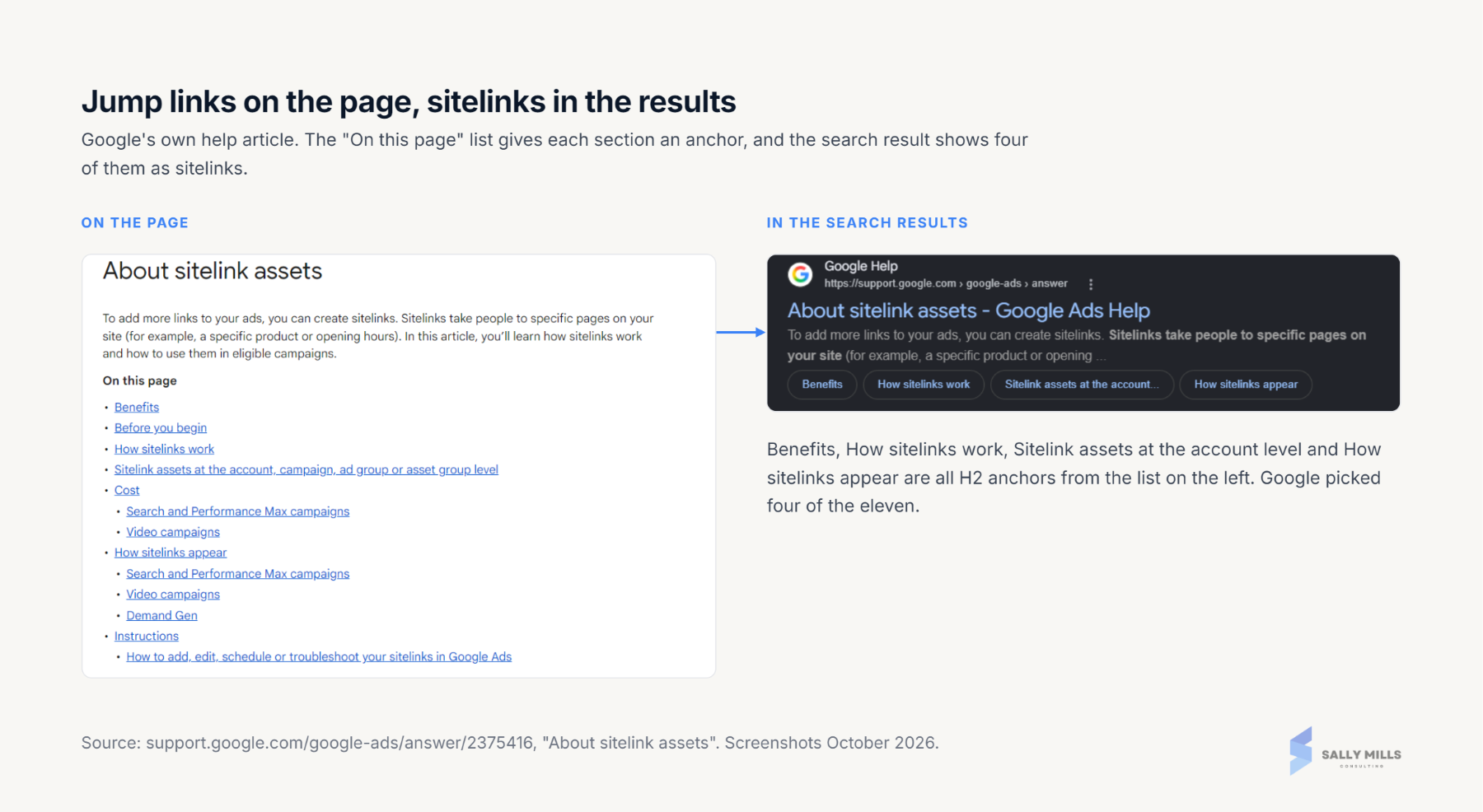
Having a table of contents at the start of your content is hugely beneficial to the user and can earn you sitelinks in Google’s search results. Often, systems can make this quite a manual job to create, forcing the content creator to manually create each link and ID tag for the headings of the page.
A good CMS should automate this task completely by grabbing the H2s of the page and pulling them into the component. To go above and beyond, they should also allow you to exclude specific headings and choose whether to include H3s and H4s.
I’ve had to get this built by a developer in enterprise CMSs. Even WordPress needs a plugin like Rank Math to do it, which tells you how far down the list it sits for most platforms.
Handling Of 404s, 301s, And 410 HTTP Status Codes
SEOs can often become maintenance people, cleaning up broken links, redirecting pages that are gone, then, of course, cleaning up internal links that are now redirecting. There are a few different levels of automation that CMSs could offer to reduce the manual workload of SEOs.
Cleaning Up Internal 301 Links
I’ve worked on large editorial websites where there simply isn’t the resource to go through and replace each link that redirects.
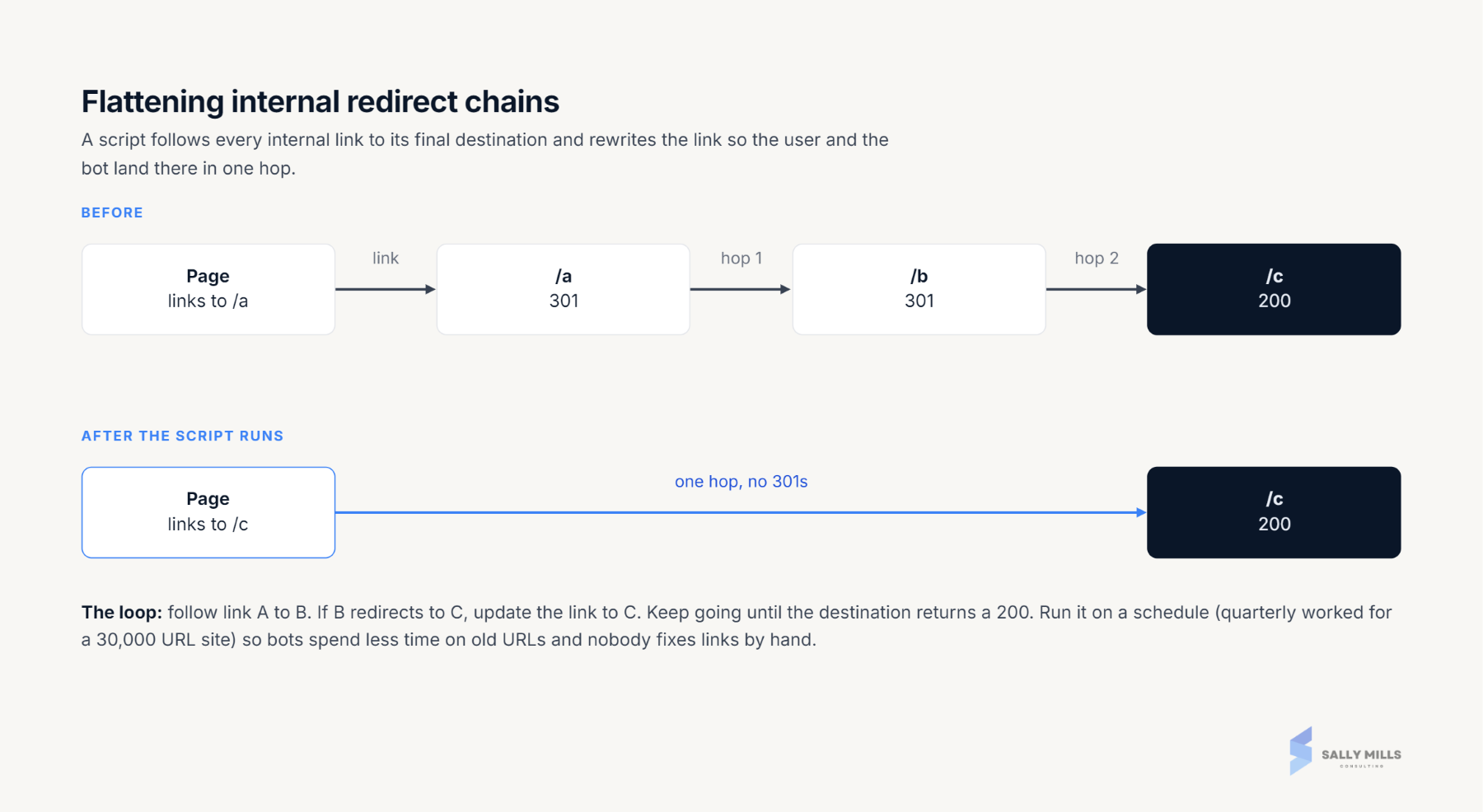
The biggest run I’ve done was after a migration of a site with tens of thousands of URLs from an old .NET platform to a new CMS. Every internal link on the site still pointed at the old URL and hopped through a redirect to get to the new one. We wrote a Python script against the CMS API that followed each link to its final destination and rewrote it, so nobody had to fix links by hand.
Having this script run regularly ensures bots spend less time on old URLs, users get to their destinations quicker, and the business spends less time on manual cleanup tasks.
Automatically Redirecting On URL Change
A CMS should also be flagging when a page’s URL has been changed and automatically adding a 301 redirect from the old URL to the new. This change would reduce delayed clean-up from SEOs and would result in a better user experience.
If they wanted to go above and beyond, a clean-up script should be scheduled to automatically update any internal links that still point to the old URL. Extra points if the system could suggest a relevant URL to redirect to.
404 Internal Link Report
We often have to rely on technical SEO tools to report on 404 errors. I think in today’s world of monitoring, CMSs should offer offer a report of broken links and allow SEOs to bulk upload the correct links or decide to remove the link. So often, we find ourselves having to edit 404 links one by one – and often the same link.
410 Status Codes
It’s still incredibly rare that we have systems that offer the functionality to set a URL or a folder of URLs to a 410 status code. To this day, I’ve only used a 410 a few times on a live site. With most CMSs not providing this functionality, SEOs tend to land on redirecting or leaving as a 404.
Redirect And Status Code Manager
Most platforms these days have some form of redirect manager; however, so often they are missing important customization and safeguards.
- Choice of HTTP Status Code – 301, 302, 307/308, 410.
- Regex rules.
- Control URL query strings or parameters.
- Guardrails to protect against redirect loops.
- Scheduled expiry – promotional and event pages auto 301 or 410 on an end date.
Guardrails matter more than any other item on this list. I once took an entire website down with a single stray pipe character in a regex redirect rule. One | in the wrong place matched every URL on the site and sent all of them to the same page. A redirect manager that tested the rule against a sample of URLs before saving would have caught it in seconds.
Image Optimization
To this day, I haven’t found a CMS that does a great job of handling different image files. Often they’ll have a range of issues that negatively impact SEO.
Out of the box, a CMS should:
- Keep one clean, stable URL per image, whether it’s served from the CDN or resized.
- Resize, crop, compress, and convert to WebP or AVIF on upload.
- Add image width and height attributes to prevent CLS issues.
- Lazy load images, except the first one on the page.
- Allow a custom OG image on every page.
- Let you set max-image-preview: large.
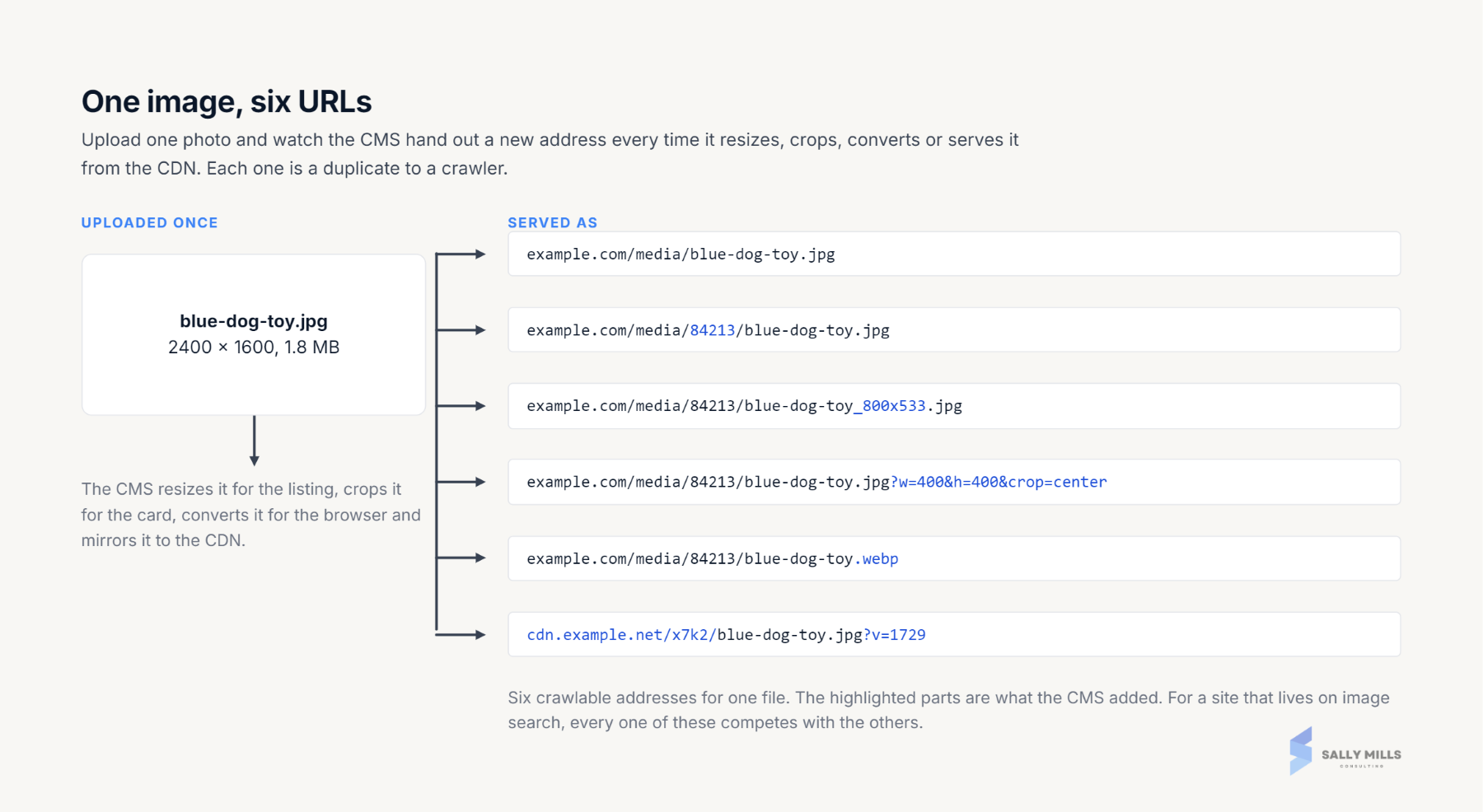
One of my biggest gripes is the messy and multiple different versions of an image URL. One enterprise system I’ve worked with would add an ID to every image file, and applying different optimizations like sizing or cropping within the platform would result in numerous different URLs. And you could still reference the image directly without the ID. For websites where image search is vital, this could cause major duplication issues.
MCP, CLI Connection, API Or At Least A CSV Bulk Upload
Previously, it was an absolute requirement for me to have a CMS that allowed for either bulk importing content changes through CSV or API alongside a Python script. With the way AI is changing our work processes, having the ability to connect your AI agent through CLI or MCP is incredibly helpful.
As of this year, I’m finding myself making fewer changes directly in a CMS and instead connecting to MCPs or CLI. If you are running your own WordPress environment, I would recommend testing out the Claude Code and CLI connection. On some of my websites, I can now update content and development work directly from Claude.
As always with anything AI and connecting to public websites, make sure you have testing processes and guardrails set up to ensure that you don’t break anything important.
Header And Body Scripts
In big businesses, we often see repeatable small tickets take up developers’ time that simply require them to upload a new marketing script to the HTML head or the top of the body. One of the best time-saving opportunities is to provide a CMS settings section that allows you to add scripts manually.
In the past, this has given me the flexibility to quickly trial new schemas, tracking tools, and metadata.
However, this does require trust between the development and marketing teams, as it is a way to break something. So always include code validation and a release process to protect your website.
Where Do You Go From Here
Every CMS is going to be different, so the best thing you can do is work with what you have. People often ask me for a CMS recommendation, and in very SEO style I say, “It depends.” And often, we aren’t the person who gets to make that decision.
I encourage everyone to problem-solve and try to automate where possible. Analyze where you or the team are spending most of your time and which tickets keep coming up time and time again. Work closely with developers to build out solutions that can grow as the business grows and give you the flexibility to implement yourself.
More Resources:
- WordPress SEO Checklist: Get Ready For (Site) Launch
- The 10 Best Headless CMS Platforms To Consider
- CMS Market Share Trends: Top Content Management Systems (Oct 2025)
Featured Image: jadamprostore/Shutterstock
